
SSL Certificate Monitoring in
3 Easy Steps
Step 1
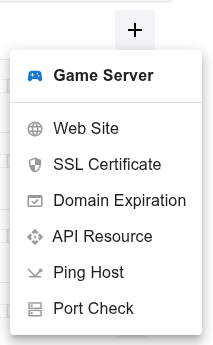
Open the dashboard, click the  button, and select SSL Certificate from the dropdown menu.
Step 2
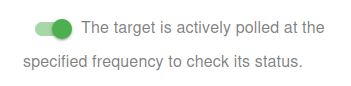
Choose whether to activate the monitor immediately or keep it paused for now:
- Active: The target is actively polled at the specified frequency to check its status.
- Paused: The target is temporarily inactive and will not be polled until set to active again.
Step 3
Set the Name and Domain for your target. The Name will be used in alerts, reports, and other notifications.
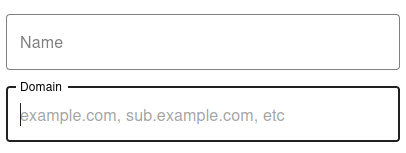

You have now set the minimum required settings to start monitoring your resource/target.
The next steps are optional.
If you click Save, our bots are ready to start scanning and monitoring your SSL Certificate
Check type
Choose the SSL check type:
-
Basic: Basic SSL check using
opensslwithout detailed certificate checks. - Advanced: Advanced SSL check with detailed certificate and status verification.

Notification Settings – Choose how you want to receive alerts
How would you like to be notified?
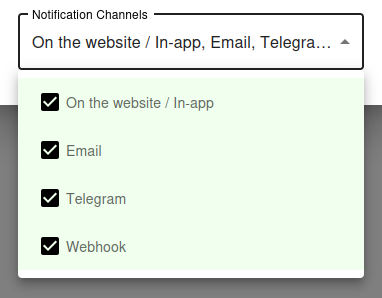
By default, all available notification channels are enabled:
- On the website / In-app
- Telegram
- Webhook
You can customize which channels to use for this monitor individually, or globally manage permissions for Email, Telegram, and Webhook notifications via your Notification Channels settings.
✅ Recommended: Keep all channels enabled for maximum awareness of uptime issues, but adjust according to your preferences and workflow.
Why SSL Certificate Monitoring Is Critical
An Expired Certificate Brings Down Everything HTTPS
The moment your SSL certificate expires, every modern browser starts showing a full-screen security warning to anyone visiting your site. The page does not load - visitors see a red warning that says "Your connection is not private" or "This site is not secure", and most close the tab immediately.
Beyond the website, expired certificates break API integrations, mobile apps, third-party webhooks, mail servers running on TLS, and any service that depends on a valid HTTPS chain. Customers cannot access their accounts, payments fail, and your support inbox fills up with frustrated emails - all because of a forgotten renewal.
Even Auto-Renewal Can Fail Silently
Many teams assume that because they configured Let's Encrypt or another automated CA, certificate expiration is no longer their problem. In practice, auto-renewal fails more often than people expect: DNS validation breaks, account credentials expire, rate limits get hit, filesystem permissions change after a server restart, or the cron job stops running without anyone noticing.
The only way to be confident that your certificates are valid is to externally verify the certificate that is actually deployed on your server, on a regular schedule, with alerts when something is wrong. That is exactly what UptyBots does.
Basic vs Advanced SSL Check
When to Use Basic Mode
Basic mode uses the standard openssl client to connect to your server, fetch the certificate, and read its expiration date and basic metadata.
It is fast, lightweight, and works for the vast majority of websites and services.
Choose Basic mode for:
- Standard HTTPS websites with a single certificate per domain
- API endpoints that use a publicly trusted CA
- Servers behind common load balancers and CDNs
- When you only care about expiration dates and basic certificate validity
When to Use Advanced Mode
Advanced mode performs a deeper inspection of the certificate chain, including intermediate certificates, the root CA, signature algorithms, key strength, SAN entries, and OCSP/CRL status. It is slower than Basic but catches problems that a simple expiration check would miss.
Choose Advanced mode for:
- Certificates with complex SAN configurations or wildcards
- Servers behind unusual proxies that might mess with the chain
- Compliance scenarios where you must validate the full certificate chain
- Production services where any subtle issue is worth catching early
Best Practices for SSL Management
Automate Renewal, Verify Externally
Use Let's Encrypt or another automated CA whenever possible - the 90-day renewal cycle forces automation, which catches problems early. Long-validity commercial certificates (1 year) are dangerous precisely because failures hide for months until everything breaks at once.
Automation is necessary but not sufficient. Always pair it with external monitoring that connects to your server and verifies the actual deployed certificate, not the one that "should be" there based on your config.
Monitor Every Subdomain and Port
It is not enough to monitor your main domain. Each subdomain that serves HTTPS - www, api, admin, mail, staging - typically has its own certificate or its own SAN entry.
Each one can fail independently.
Mail services use SSL on non-standard ports: 993 (IMAPS), 995 (POP3S), 465 (SMTPS), 587 (STARTTLS). Add a separate monitor for each port that serves TLS.
Alert at Multiple Thresholds
Configure alerts at 30 days, 14 days, 7 days, and 1 day before expiration. Multiple thresholds give you progressively more urgent warnings - even if you ignore the first reminder, the second or third will catch your attention in time.
For Let's Encrypt certificates that auto-renew at 30 days remaining, an alert at 30 days actually serves as confirmation that auto-renewal is working: if you receive the alert, the renewal did not happen and something is wrong.
Test the Full Certificate Chain
A certificate can be valid but still cause errors in some clients if intermediate certificates are missing from the chain. Browsers often have intermediates cached and may not catch the problem, but mobile apps, API clients, and stricter TLS implementations will fail.
Use Advanced mode to verify the full chain is correctly served by your server. If the chain is broken, fix it by configuring your web server to send the intermediate certificates along with your leaf certificate.
Common Questions
How often does UptyBots check my certificate?
SSL certificates are checked regularly throughout the day, with the exact frequency depending on your plan. Even with infrequent checks, this is more than enough granularity to catch expiration well before it becomes an issue, since alerts fire weeks in advance.
Can I monitor certificates on internal networks?
Our monitoring bots run on the public internet, so they can only check certificates that are externally reachable. Internal certificates inside private networks are not supported - for those, use an internal monitoring tool that runs inside your network.
What about wildcard certificates?
Wildcard certificates work fine with our monitoring. Just add the specific subdomain you want to verify (for example, api.example.com) and the checker will validate the wildcard certificate against that hostname.
My certificate is valid but the check fails. Why?
A few possibilities: your server may be presenting different certificates based on SNI hostname; intermediate certificates may be missing from the chain; the server may be behind a firewall that blocks our checker IPs; or the certificate may be technically expired even though some clients still accept it. Try running a manual check from a different network to confirm.