
Embed Uptime Status Widget in
3 Easy Steps
Step 1
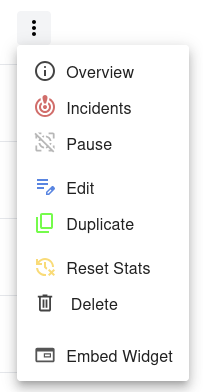
Open your dashboard and locate the monitor you want to share. Click the menu button next to it and select Embed Widget from the dropdown menu.
Step 2
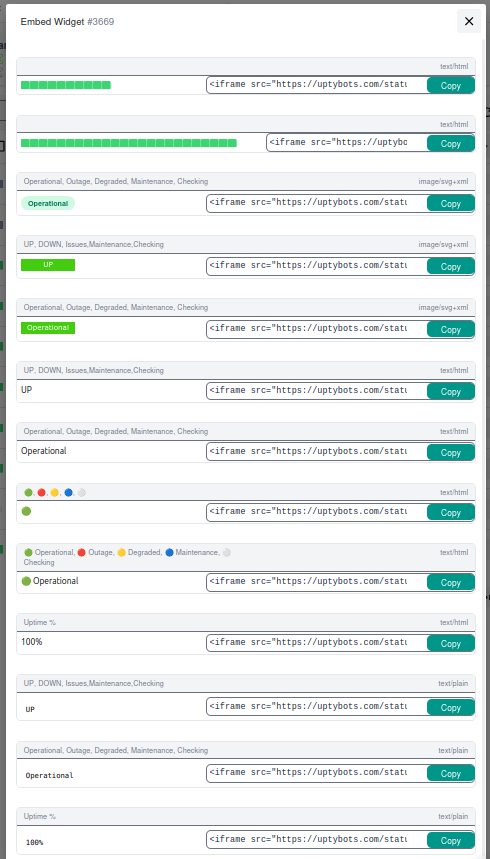
A dialog with available embed widget examples will appear. Choose the widget style that fits your needs and copy the provided embed code.
Step 3
Paste the copied embed code into your website’s HTML
where you want the status widget to appear.
That’s it - the widget will automatically display
the current monitor status on your site.

Your embed widget is now live 🎉
It will automatically update as the monitor status changes.
You can embed the same widget on multiple pages or websites without any additional setup.
Why Embed a Status Widget on Your Website?
Build Trust With Your Visitors
Visitors who see a live status indicator on your website immediately know that you take reliability seriously. A small green badge that says Operational next to your service name communicates more trust than any marketing claim. It tells customers you are not hiding outages and that you actively monitor your own infrastructure.
For SaaS products, e-commerce stores, APIs, and developer tools, a public status widget is one of the easiest ways to show that uptime matters to you. It also reduces support tickets - instead of asking "is your service down?", customers can see the answer for themselves.
Reduce Support Load
When something goes wrong, the first wave of support tickets is usually "is it just me, or is the service down?". A live widget on your homepage, login page, or documentation answers that question instantly, without the visitor needing to contact you.
During incidents, the widget automatically reflects the current monitor state, so customers get accurate information in real time without you needing to update anything manually. Combine it with your incident communications for a complete transparency story.
Available Widget Styles
UptyBots offers thirteen different widget styles so you can pick the one that fits the design and purpose of your page.
All widgets are delivered as a simple <iframe> snippet - no JavaScript, no external libraries, no build step.
Each widget renders a single monitor's current state and updates automatically.
Status Bars (Compact & Wide)
Two horizontal bar widgets are available for the top or bottom of a page, as a notification strip, or as a footer-aligned status indicator.
- Compact bar – 160 pixels wide, 14 pixels tall. Ideal for sidebars, headers, and tight layouts.
- Wide bar – 400 pixels wide, 14 pixels tall. Better for full-width footer strips and dedicated status sections.
Both bars display the current state in a single line of text and resize gracefully to fit the parent container.
SVG Image Badges
Three SVG-based image badges are available, each rendered as a small image (around 80x24 pixels) that fits naturally next to a service name, in a navigation bar, or in a card layout.
- SVG badge with Operational / Outage / Degraded / Maintenance / Checking labels.
- SVG badge with UP / DOWN / Issues / Maintenance / Checking labels.
- Alternate SVG style with the same Operational/Outage labels and a different visual treatment.
SVG badges are particularly useful in environments where you want a clean image-style indicator rather than embedded HTML.
HTML Text Badges
Five small HTML widgets (around 80x20 pixels) display the monitor state as styled text. These are the most flexible option and blend in naturally with most page designs.
- UP / DOWN short text status.
- Operational / Outage / Degraded / Maintenance / Checking verbose status.
- Emoji circles – 🟢 🔴 🟡 🔵 ⚪ – minimal indicator, perfect for dense lists.
- Emoji + label – 🟢 Operational, 🔴 Outage, etc. – combines clarity with personality.
- Uptime % – shows the rolling availability percentage instead of the current state.
Plain Text Widgets
Three plain-text widgets (around 80x30 pixels) are designed for environments where you need the rawest possible output and minimum visual styling.
- UP / DOWN plain text status.
- Operational / Outage / Degraded / Maintenance / Checking plain text status.
- Uptime % as plain text - useful for embedding inside larger paragraphs or dashboards.
Plain text widgets are ideal when the surrounding page already has its own typography and you want the widget to inherit it as much as possible.
Where to Embed Your Widget
Marketing & Product Pages
Place a status widget on your homepage, pricing page, or product landing pages. A visible "Operational" indicator next to your hero section reassures visitors at the moment they are evaluating your product. It works particularly well for SaaS, API, infrastructure, and developer tool companies.
For e-commerce sites, place the widget in the footer or near the checkout flow to reduce abandonment caused by trust concerns during outages.
Documentation & Help Centers
Documentation portals are one of the most effective places for a status widget. Users who arrive at your docs while troubleshooting can immediately see whether the issue is on your side or theirs, which dramatically reduces support load.
Add the widget to your sidebar, the top of every doc page, or a dedicated System Status page linked from the main navigation.
GitHub READMEs & Open Source Projects
SVG-based status badges work natively in GitHub README files, GitLab repositories, Bitbucket projects, and any markdown-based documentation. Drop the iframe into a markdown file or use the underlying SVG URL directly with markdown image syntax.
For open source projects, having a public uptime badge next to "build status", "code coverage", and "license" signals that the project is actively maintained and that the maintainer cares about reliability.
Internal Dashboards & Team Pages
Beyond public-facing pages, status widgets are useful inside internal tools. Embed them on team Confluence pages, Notion documents, internal wikis, or SRE dashboards so your engineers always have an at-a-glance view of critical services.
Combine multiple widgets on a single page to build a lightweight aggregate status board without needing a dedicated status page solution.
How Real-Time Updates Work
No Polling Code on Your Side
Unlike custom-built status indicators, the UptyBots embed widget does not require any JavaScript on your page. The iframe loads a small page from UptyBots, and that page periodically refreshes itself to display the latest monitor state.
This means there is zero impact on your page's main thread, no extra dependencies in your bundle, and no risk of breaking your site if the widget endpoint is temporarily slow.
Backed by Real Monitoring Data
The state shown by the widget is the same state used by alerts, the dashboard, and the API. When our monitoring bots detect that the target is down, the widget reflects that change automatically on the next refresh - typically within seconds of the alert being raised.
There is no separate "widget data" - everything comes from the live monitoring pipeline, so the indicator on your site is always consistent with what you see in the dashboard.
Customization & Best Practices
Multiple Widgets on One Page
You can embed as many widgets as you want on a single page - one per monitored service. Each iframe is independent, so the failure or slowness of one will not affect the others. This makes it easy to build a quick aggregate view of all your services without setting up a dedicated status page solution.
For best performance, group related widgets together visually so visitors can scan them at a glance.
Reusing the Same Widget Across Sites
The widget snippet is just an iframe - there are no domain restrictions and no per-site configuration. Once you copy the embed code, you can paste it into any website, internal tool, documentation page, or markdown file.
If you maintain a network of related sites, you can reuse the same widget across all of them without re-generating anything.
Sizing & Mobile Responsiveness
Each widget has a recommended min-width and fixed height to ensure the content
renders correctly. The iframe will respect those values but you can wrap it in a responsive container
to adapt to different screen sizes.
For mobile-first layouts, prefer the compact 80x20 text badges or the SVG image badges, which scale gracefully without breaking the surrounding layout.
Loading Performance
All widget snippets include the loading="lazy" attribute, which tells the browser
to defer loading the iframe until it is about to appear on screen. This means embedding multiple
widgets in a long page does not slow down the initial page load.
The widget iframe itself is lightweight - typically a few kilobytes - so even on slow connections it loads quickly without affecting the host page's perceived performance.
Common Questions
Does the widget require an account for visitors?
No. The widget is fully public - anyone visiting your page can see the current status without logging in. Only the monitor's public ID is exposed; no private dashboard data is shared.
Can I use the widget offline?
The widget loads its content from UptyBots, so an active internet connection is required to display the current state. If the visitor is offline, the iframe will simply not load, and the rest of your page will continue to render normally.
Will embedding the widget affect my SEO?
No. Iframes are isolated from the host page's SEO context, so the widget content does not appear in your page's indexable text. Search engines will see the iframe element itself but will not treat it as part of your page's content.
Can I style the widget myself?
The widget itself is rendered inside an iframe, which means you cannot directly style its internal HTML from your host page's CSS. However, you can choose between thirteen pre-built styles, and you can wrap the iframe in your own container to control its position, margins, and surrounding layout.