
Domain Expiration Monitoring in
3 Easy Steps
Step 1
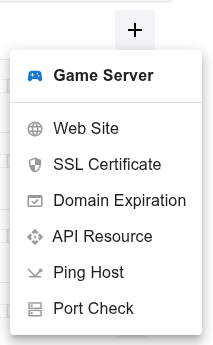
Open the dashboard, click the  button, and select Domain Expiration from the dropdown menu.
Step 2
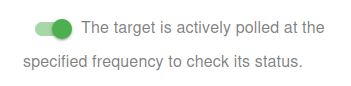
Choose whether to activate the monitor immediately or keep it paused for now:
- Active: The target is actively polled at the specified frequency to check its status.
- Paused: The target is temporarily inactive and will not be polled until set to active again.
Step 3
Set the Name and Domain for your target. The Name will be used in alerts, reports, and other notifications.
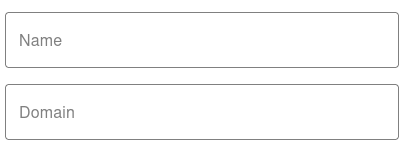

You have now set the minimum required settings to start monitoring your resource/target.
The next steps are optional.
If you click Save, our bots are ready to start scanning and monitoring your Domain Expiration
Notification Settings – Choose how you want to receive alerts
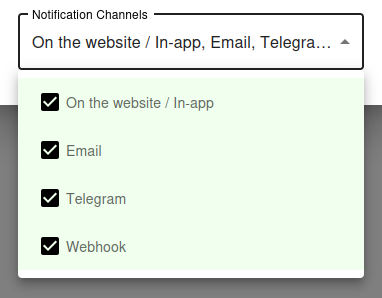
How would you like to be notified?
By default, all available notification channels are enabled:
- On the website / In-app
- Telegram
- Webhook
You can customize which channels to use for this monitor individually, or globally manage permissions for Email, Telegram, and Webhook notifications via your Notification Channels settings.
✅ Recommended: Keep all channels enabled for maximum awareness of uptime issues, but adjust according to your preferences and workflow.
Why Domain Expiration Monitoring Matters
The Worst Outage You Can Have
Of all the ways a website can go down, an expired domain is the most embarrassing - and the most preventable. When your domain expires, the registrar parks it, your DNS records disappear, and your website, email, and every service tied to that domain stop working completely. There is no graceful degradation, no partial recovery - everything is offline until you renew, and renewal can take hours or days to propagate.
Domain expiration is also one of the rare outages that affects every part of your business simultaneously. Your website is down, your email accounts stop receiving messages, your APIs stop responding, your customer's automated integrations break, and search engines start dropping you from the index.
It Happens More Often Than You Think
Even large companies - including major banks, government agencies, and Fortune 500 brands - have suffered outages because someone forgot to renew a domain. The most common scenarios are: the credit card on file expired, the renewal email went to a former employee, the registrar account password was lost, or the domain was on auto-renewal but the auto-renewal silently failed.
Manual reminders fail because people leave, calendars get reset, and renewal emails go to spam. Auto-renewal fails because payment methods expire or get declined. The only reliable solution is external monitoring that watches the actual WHOIS expiration date and alerts you well in advance.
How UptyBots Domain Monitoring Works
WHOIS-Based Expiration Tracking
Our monitoring bots query the WHOIS database for your domain on a regular schedule and read the official expiration date directly from the registry. This is the same source of truth used by registrars and ICANN, so the expiration date you see in the dashboard is exactly what determines when your domain will expire.
The check runs daily by default, which is more than enough granularity for catching expiration before it happens. WHOIS responses are usually fast and reliable, but our system gracefully handles registries that are temporarily slow or unresponsive.
Proactive Alerts at Multiple Thresholds
Instead of a single warning right before expiration, UptyBots can send you progressively more urgent alerts at multiple thresholds:
- 30 days before expiration - friendly reminder to plan renewal
- 14 days before expiration - first urgency signal
- 7 days before expiration - high urgency, drop everything
- 1 day before expiration - emergency, critical alert
Even if you ignore the first alert, the second or third will catch your attention in time to renew without downtime.
Best Practices for Domain Management
Use a Shared Registrar Account
Avoid registering business domains under personal accounts. When the employee leaves, the renewal emails go to an inbox nobody monitors. Use a shared registrar account with credentials stored in a team password manager so multiple people can access it.
Some registrars also support multi-user access with role-based permissions - use this if available so you do not have to share login credentials.
Lock Critical Domains
Enable registrar lock (also called transfer lock or clientTransferProhibited) on your important domains. This prevents anyone from initiating a domain transfer to another registrar without first unlocking it, protecting against social engineering attacks and accidental transfers.
For very high-value domains, consider registry lock (a manual process at the registry level), which adds another layer of protection beyond the registrar.
Renew Long, Renew Early
Most registrars allow you to renew up to 10 years in advance. For your primary business domains, consider renewing for 5 to 10 years at once. This eliminates the risk of forgetting renewal each year and is a small SEO signal of long-term commitment.
For less critical domains (testing, throwaway, personal), keep them on shorter renewal cycles to avoid wasting money on domains you no longer need.
Keep Contact Information Up to Date
Registrars are required to send renewal reminders and important notices to the email address on the domain's WHOIS record. If that email is no longer monitored, you will miss critical notifications about expiration, transfers, or registry actions.
Use a shared inbox or distribution list (like domains@yourcompany.com) instead of a personal email so multiple people receive registrar notifications.
Common Questions
How often should I check my domain expiration?
UptyBots checks once per day by default, which is the right balance between freshness and not hammering WHOIS servers. WHOIS data does not change frequently, so checking more often provides no real benefit.
What happens if WHOIS is temporarily unavailable?
Our monitoring system handles transient WHOIS failures gracefully - a single failed check does not trigger a false alert. Only persistent failures over multiple consecutive checks are reported, and even then we differentiate between "WHOIS server unavailable" and "domain actually expired".
Does this work for all TLDs?
Yes, UptyBots supports all major TLDs including .com, .net, .org, .io, country-code TLDs (.co.uk, .de, .fr, etc.), and most new generic TLDs.
A few obscure TLDs use non-standard WHOIS formats and may not be fully supported - contact support if your TLD does not work.
Can I monitor multiple domains?
Yes. Add each domain as a separate monitor target. You can configure independent expiration thresholds and notification settings per domain, so high-value domains can have more aggressive alerting than less critical ones.